

LLM Tool Calling in 2026: How to Build Reliable Function-Calling Agents
Tool calling is the primitive that turns LLMs into agents that actually do things. This guide covers schema design, parallel execution, error handling, and observability for production-grade function-calling agents in 2026.

Why Tool Calling Is the Foundation of Every Useful AI Agent
Ask a language model to send an email, query a database, or call an external API — and without tool calling, it can only pretend. It will hallucinate a response, fabricate the data, and act as if the action happened. Tool calling is what turns a text generator into a system that actually does things.
In 2026, tool calling — also called function calling — is the core primitive behind every production AI agent. From customer support bots that look up orders, to coding agents that run tests, to data pipelines that fetch and transform records: they all rely on the same mechanism. And yet most developers still implement it in a fragile, ad-hoc way that breaks in production.
This guide is about building tool-calling agents that are actually reliable: correct schema design, parallel calls, error recovery, and observability. Let's go deep.
How Tool Calling Actually Works
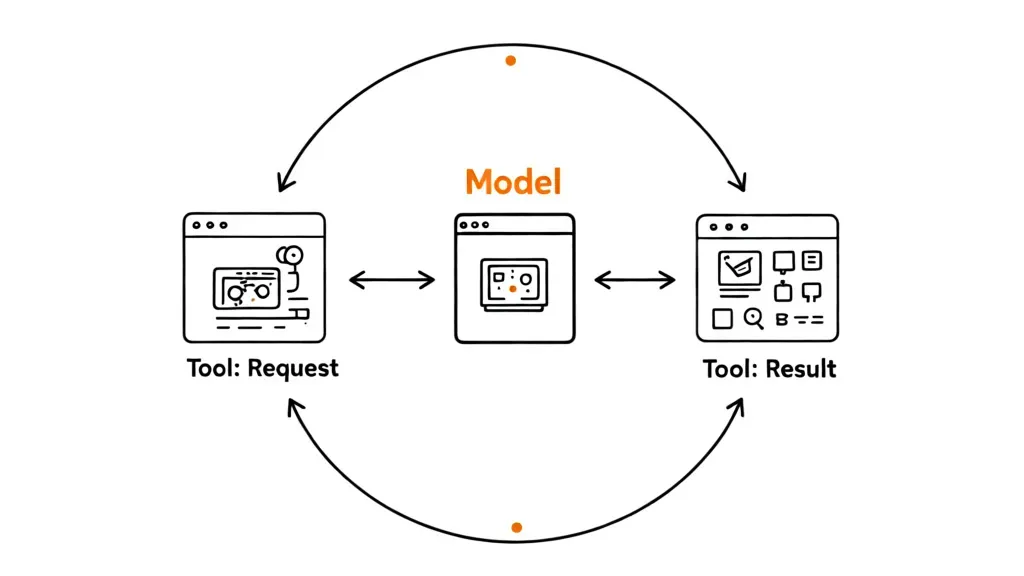
Here is what happens at the protocol level when you call an LLM with tools defined:
- You send the model a system prompt, a user message, and a JSON schema describing available tools (name, description, parameters).
- The model responds with either a text message OR a structured
tool_useblock specifying which function to call and with what arguments — already serialized as valid JSON. - Your code executes the actual function call.
- You send the result back as a
tool_resultmessage. - The model resumes and either calls another tool or generates a final response.
This is fundamentally a loop. The model decides; your code acts; the model sees results and decides again. Understanding this loop is critical to building agents that don't get stuck, loop forever, or silently fail.
The Schema Is the Contract
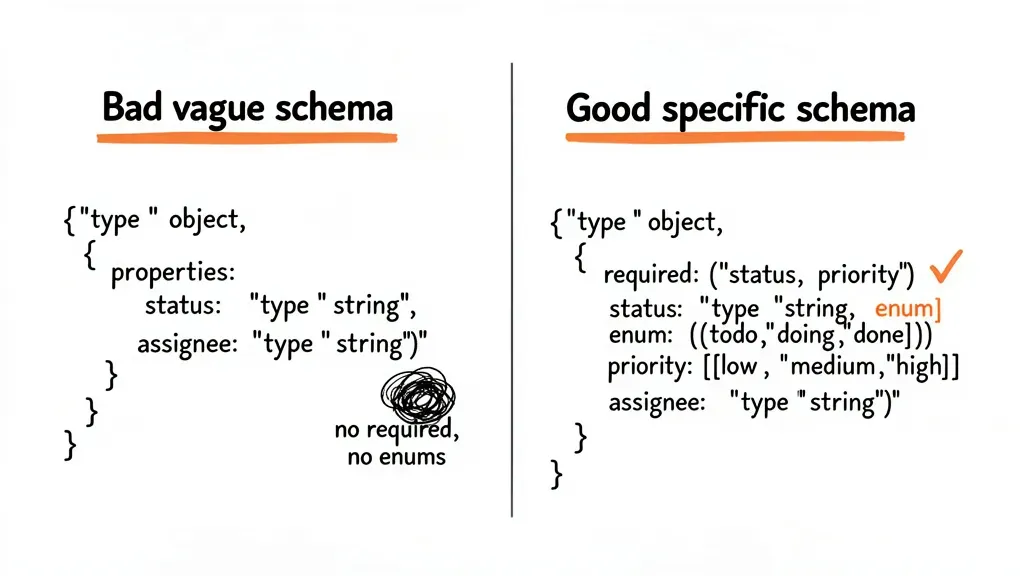
Every tool is defined by a JSON Schema. This is not optional decoration — the model uses it to generate valid arguments. Garbage schema equals garbage calls. There are three things that kill reliability at the schema level:
- Missing descriptions — The model needs to understand when to use each tool, not just what it does. Write a description that explains the use case, not just the function signature.
- Overloaded tools — A tool that does five different things based on a mode parameter confuses the model. Split it. One tool, one responsibility.
- Ambiguous types — Use explicit enums for categorical parameters. Don't make the model guess whether a date is ISO 8601 or Unix timestamp.
# Bad schema — vague, no description, overloaded
{
    "name": "query",
    "description": "Query stuff",
    "input_schema": {
        "type": "object",
        "properties": {
            "q": {"type": "string"},
            "mode": {"type": "string"},
        }
    }
}

# Good schema — specific, explicit, one responsibility
{
    "name": "search_orders",
    "description": "Search customer orders by status, date range, or order ID. Use this when the user asks about their order history or a specific order.",
    "input_schema": {
        "type": "object",
        "properties": {
            "customer_id": {
                "type": "string",
                "description": "The customer's unique ID (UUID format)"
            },
            "status": {
                "type": "string",
                "enum": ["pending", "shipped", "delivered", "cancelled"],
                "description": "Filter by order status"
            },
            "from_date": {
                "type": "string",
                "description": "Start date in ISO 8601 format (YYYY-MM-DD)"
            }
        },
        "required": ["customer_id"]
    }
}
Parallel Tool Calls: The Performance Multiplier
In 2026, all major frontier models support parallel tool calls — the ability to request multiple tool executions in a single turn. Claude 3.5+, GPT-4o, and Gemini 1.5 Pro all do this. If you're not using it, you're leaving serious latency on the table.
When the model needs both a user's profile and their order history, it shouldn't call one, wait, then call the other. It should request both simultaneously. Your code executes them in parallel, returns both results, and the model synthesizes a response.
import asyncio
import anthropic

client = anthropic.Anthropic()

async def execute_tool_call(tool_name: str, tool_input: dict) -> str:
    """Execute a single tool call and return result as string."""
    if tool_name == "get_user_profile":
        return await fetch_user_profile(tool_input["user_id"])
    elif tool_name == "get_order_history":
        return await fetch_orders(tool_input["customer_id"])
    raise ValueError(f"Unknown tool: {tool_name}")

async def run_agent(user_message: str) -> str:
    messages = [{"role": "user", "content": user_message}]

    while True:
        response = client.messages.create(
            model="claude-sonnet-4-6",
            max_tokens=4096,
            tools=TOOLS,
            messages=messages,
        )

        if response.stop_reason == "end_turn":
            # Extract final text response
            return next(b.text for b in response.content if b.type == "text")

        if response.stop_reason == "tool_use":
            # Collect ALL tool calls from this response
            tool_calls = [b for b in response.content if b.type == "tool_use"]

            # Execute ALL in parallel
            results = await asyncio.gather(*[
                execute_tool_call(tc.name, tc.input)
                for tc in tool_calls
            ])

            # Append assistant turn with tool calls
            messages.append({"role": "assistant", "content": response.content})

            # Append tool results as user turn
            messages.append({
                "role": "user",
                "content": [
                    {
                        "type": "tool_result",
                        "tool_use_id": tc.id,
                        "content": result,
                    }
                    for tc, result in zip(tool_calls, results)
                ]
            })
This pattern cuts latency roughly in half when multiple tools are needed. For three parallel calls that each take 200ms, you pay 200ms total instead of 600ms.
Error Handling: The Part Everyone Gets Wrong
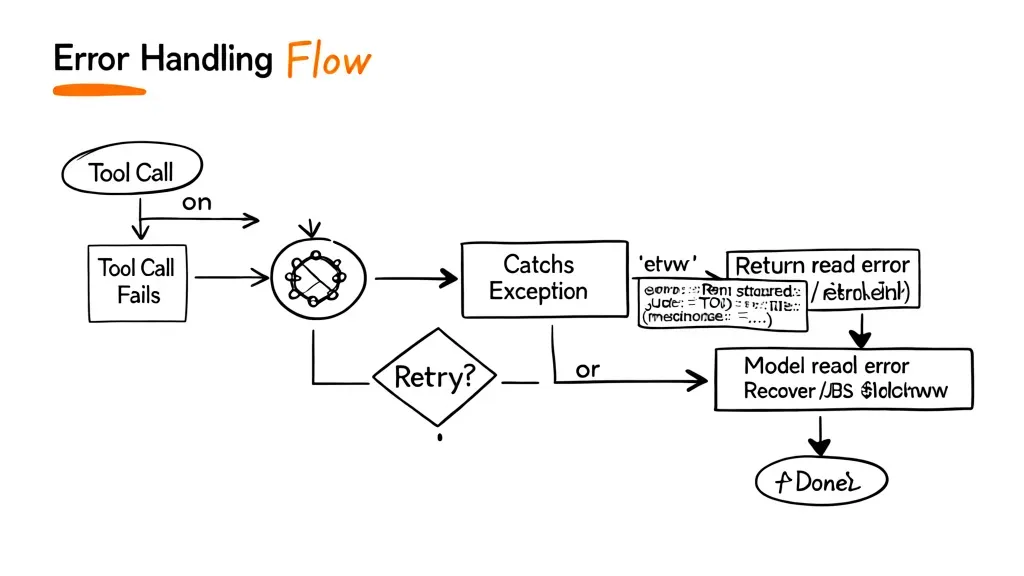
Tool calls fail. APIs go down. Rate limits hit. Malformed inputs happen. If you don't handle errors explicitly in tool results, the model will either hallucinate that the call succeeded or enter an infinite retry loop.
The right approach: always return a result, even for failures. Make the error informative so the model can decide what to do next — retry with different parameters, ask the user for clarification, or gracefully degrade.
async def safe_tool_call(tool_name: str, tool_input: dict) -> str:
    try:
        result = await execute_tool_call(tool_name, tool_input)
        return json.dumps({"status": "success", "data": result})
    except RateLimitError:
        return json.dumps({
            "status": "error",
            "error": "rate_limit",
            "message": "Service is busy. Please try again in 30 seconds.",
            "retry_after": 30
        })
    except ValidationError as e:
        return json.dumps({
            "status": "error",
            "error": "invalid_input",
            "message": str(e),
            "hint": "Check the required parameter format"
        })
    except Exception as e:
        return json.dumps({
            "status": "error",
            "error": "unexpected",
            "message": "An unexpected error occurred. The action was not completed."
        })
Notice the structured JSON error format. This is important: the model can parse structured errors and reason about them. A plain string "Error 500" tells the model nothing actionable. A structured response with error, message, and optionally retry_after gives the model information to act on.
Tool Choice Control: When to Force, When to Let Go
Every major API gives you control over tool selection:
auto(default) — The model decides whether to call a tool or respond directly. Use this for most agents.any— Forces the model to call some tool. Useful when you need structured output and a text response is wrong.{"type": "tool", "name": "..."}— Forces a specific tool call. Use for structured data extraction when you know exactly what you need.
# Force a specific tool — useful for structured extraction
response = client.messages.create(
    model="claude-sonnet-4-6",
    max_tokens=1024,
    tools=[EXTRACT_ORDER_TOOL],
    tool_choice={"type": "tool", "name": "extract_order_details"},
    messages=[{"role": "user", "content": raw_email_text}],
)
Forcing tool use is particularly powerful for information extraction pipelines: instead of prompting the model to "output JSON", you define a tool schema and force-call it. The model is constrained to produce valid, schema-compliant output — no post-processing needed.
Preventing Infinite Loops with Max Iterations
Without a loop limit, a confused or poorly-configured agent can call tools indefinitely. This burns tokens, costs money, and usually never resolves. Always add a maximum iteration count:
MAX_TOOL_ITERATIONS = 10

async def run_agent_safe(user_message: str) -> str:
    messages = [{"role": "user", "content": user_message}]
    iterations = 0

    while iterations < MAX_TOOL_ITERATIONS:
        response = client.messages.create(...)

        if response.stop_reason == "end_turn":
            return extract_text(response)

        if response.stop_reason == "tool_use":
            iterations += 1
            # ... handle tool calls ...

    # Max iterations reached — return what we have or raise
    return "I reached my operation limit. Here's what I found so far: ..."
10 iterations is a reasonable default for most agents. Complex research agents might need 20-30. If your agent consistently hits the limit, that's a signal your tools are too granular or your prompts need work — not that you should raise the limit indefinitely.
Observability: What to Log, What to Trace
Tool-calling agents are inherently harder to debug than single LLM calls because the interesting state is distributed across multiple turns. You need to capture the full trajectory: every tool call, its inputs, its output, latency, and which model turn it came from.
The minimum viable tracing schema for a tool call:
@dataclass
class ToolCallTrace:
    session_id: str
    turn: int
    tool_name: str
    tool_use_id: str
    input: dict
    output: str
    latency_ms: int
    success: bool
    error_type: Optional[str] = None
Tools like Langfuse and Helicone have first-class support for tracing tool-calling agents. Langfuse in particular lets you visualize the full turn-by-turn trace with tool inputs and outputs inline — essential for debugging agents that behave unexpectedly in production.
The Solopreneur Pattern: Tool Calling Without the Framework
Most tool-calling frameworks (LangChain, LlamaIndex, CrewAI) add abstraction layers that make simple things complicated and complex things opaque. For a solopreneur building a focused product, the raw Anthropic SDK + a clean loop is often better than a framework.
The pattern is simple enough to fit in 100 lines of Python. You own the loop, you control the error handling, you understand every token. When something breaks in production at 2am, you know exactly where to look.
The frameworks are worth it when you need multi-agent coordination, built-in persistence, or complex DAG execution. For a single-agent tool loop, they're usually overkill.
What's Coming: Computer Use and Extended Thinking with Tools
Two developments are reshaping tool calling in 2026:
Computer use (Anthropic's API) treats the entire computer as a tool — screenshot, click, type, scroll. The model sees the screen and takes actions. This is tool calling taken to its logical extreme: instead of a curated function library, the tool is the entire desktop interface. It's powerful but expensive and slow — use it only where a proper API doesn't exist.
Extended thinking with tool calls (Claude's extended thinking mode) lets the model reason deeply before deciding which tools to call and in what order. For complex multi-step tasks where planning matters — like building a full data pipeline or orchestrating a research task — extended thinking dramatically improves tool selection quality. The token overhead is real, so profile before enabling it everywhere.
Production Checklist: Tool Calling That Doesn't Break
- Schema quality — Every tool has a clear description explaining when to use it, not just what it does
- Single responsibility — Each tool does exactly one thing; no mode parameters
- Parallel execution — Your code runs all tool calls in a single turn concurrently
- Structured errors — Tool failures return JSON with
error,message, and actionable hints - Max iterations — Agent loop has a hard cap; graceful degradation when hit
- Full tracing — Every tool call logged with input, output, latency, session ID, and turn number
- Forced tool choice — Used for extraction pipelines where text response is a failure mode
- Timeout per tool — Each tool call has its own timeout; slow tools don't block the agent forever
Tool calling is not magic. It's a protocol — and like all protocols, its reliability depends entirely on how carefully you implement both sides. Get the schema right, handle errors explicitly, run parallel when possible, trace everything, and cap your loops. That's the difference between an agent demo and an agent in production.